
If your business is anything like First Direct Corp. it’s likely you’ve struggled with clear internal communications. As our business has grown, we’ve found that our team communications were becoming increasingly cluttered and hard to keep track of in our email inboxes.
Often times, we just need to send a simple message to each other to update the others on the progress of some company task. We were doing this via email, Skype, Yahoo Messenger, and even text messages.
Group emails can really kill productivity, especially when messages become conversational or “off-topic” chatter. No number of smart mailboxes or labels can help with the gluttony of email that fills our collective inboxes. Although certain messages need to be communicated to one person, we wanted more transparency and also to be able to include multiple people in on the conversation.
Because it helps our team if everyone is made aware of what’s going on in all sides of the business in order to either interject, ask a question, or for individuals to plan their own work around what was being done elsewhere. An email conversation can take days while you wait for people to check their email and respond. IM requires that participants stay tied down to their computer until the communication is over.
Slack has neither of these requirements. I personally prefer Slack or similar services to email because sometimes communicating via email feels like opening an envelope only to read a few words or sentences. Many messages don’t lend themselves well to email exchanges; and are better handled through online and direct conversations.
At its heart, Slack is an instant messaging and team collaboration system.
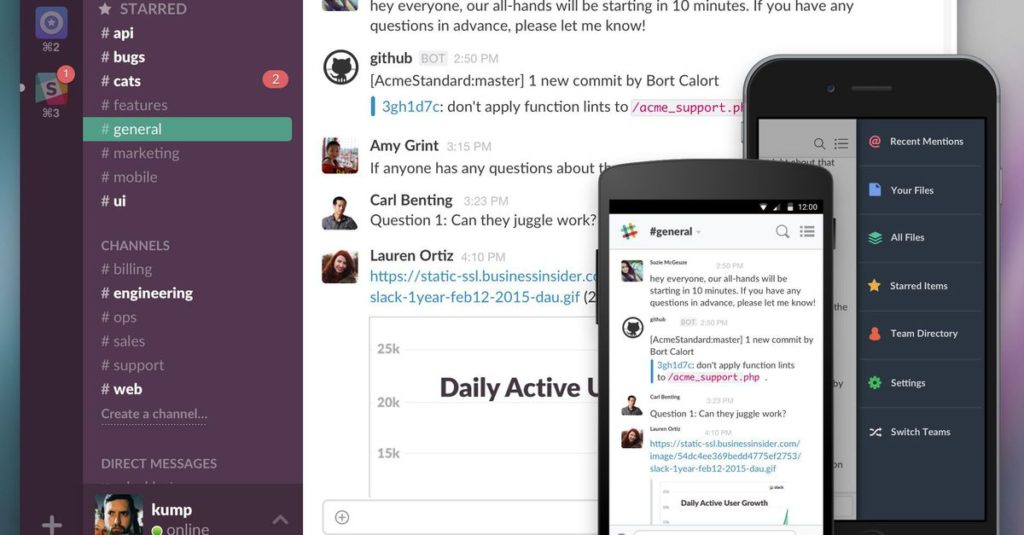
Slack is a team communication tool founded by Stewart Butterfield. It began as an internal tool used by Stewart’s company while developing a now defunct online game.
You might also recognize Stewart’s name as being one of the Co-founders of Flickr so it should be no surprise that Slack is a rock solid platform that does incredible things for team management.
The First Direct Corp. team started using Slack a couple of months ago, and it has changed the way our company works.
Here’s why…
As I mentioned above, one of the main pain points for our team was the varied ways in which we were communicating. It quickly became overwhelming to keep track of email threads a mile deep, Skype conversations, text messages, and other places in which we were talking with each other.
Slack communications happen all in one place and can be segmented by creating Channels for various topics. You can assign your users to as many (or as few) channels as you need in order to keep topics visible to the team members you want to see any individual topic.
Slack’s channels help you focus by enabling you to separate messages, discussions and notifications by purpose, department or topic.
If you need privacy, Slack provides that as well with invite-only channels.
When you need to send a message to one person instead of a group, Slack provides traditional instant messaging functionality for you to do so.
Sharing documents is one of the basics of collaboration. Slack enables you to share all types of files, even those stored outside of the solution itself:
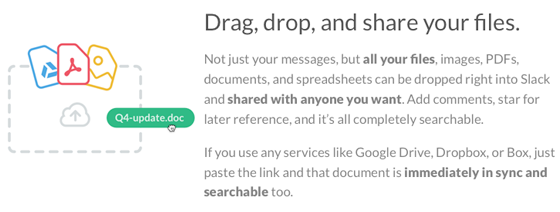
Slacks robust search functionality enables you to find key information quickly, even if it’s inside of a document you’ve shared.
Have you ever searched your email inbox to find that one piece of information you needed buried deep within a thread? We have too and it’s no easy task.
Slack makes it dead simple to find that link that someone posted 3 weeks ago that you just now want to go have a look at. Not only is the search super fast and friendly, but it’s also filterable.
Imagine this scenario…you remember you were chatting with Bob one day and he posted a link to a really great resource on what you need to accomplish with a certain task, but you can’t quite remember what the link or website was named.
Use the Slack search filter options to narrow your search to conversations only with Bob, only in a certain channel, or any of several other filters.
No matter where you go, Slack can come with you with their mobile apps for iOS, Android and Windows Phone (beta). At your desk, Slack offers apps for Mac, Windows and Linux (beta).
You may be surprised to learn that Slack offers a “free to use forever” pricing tier. For small businesses, that may be all you need. However, to truly make the most of the solution, they offer reasonable per-user pricing at both monthly and annual rates.
Integration is what takes Slack from a normal online instant messaging and collaboration system to a solution that enables you to centralize all your notifications, from sales to tech support, social media and more, into one searchable place where your team can discuss and take action on each.
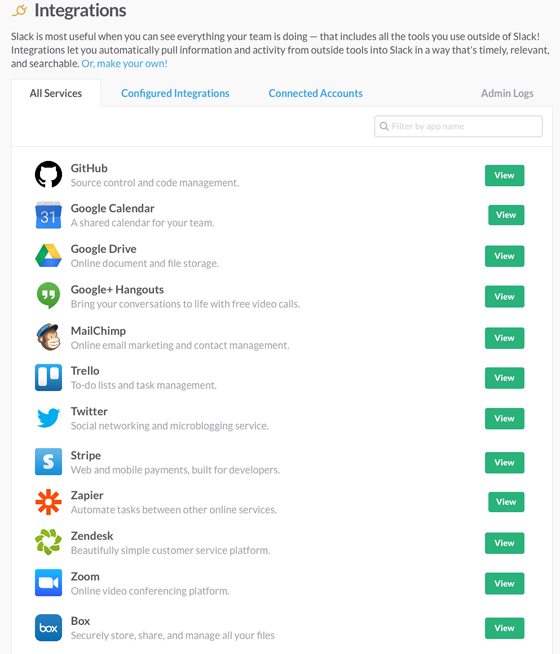
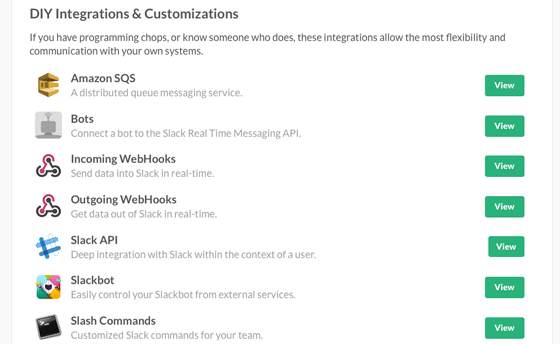 Pretty slick, eh? And that barely scratches the surface of how you can use Slack for your team.
 As a simple instant messaging system, Slack has all the collaboration features you need in place. It’s when you throw in integration that things really get exciting.
Slack as a communications tool is fantastic. It’s cross platform, and easy to catch up on messages. It’s effectiveness at the workplace, however, is largely reliant on user take up. If people still use and prefer email, and stay away from Slack then they’ll likely miss important messages and information. If, however, there is strong support and preference given to Slack as the go-to communications tool from the leadership team, then you’ll find more people will use it (whether or not they like it).
Part of the battle is with finding the right tools and technology, the other part is with workplace culture. A lot of people, especially older generations or the less tech savvy types, prefer staying in their comfort zone. If given the choice, they’ll stick with what they know, which unfortunately often means email.
If you’re thinking of testing the waters with Slack, try running a pilot with a small group of people first. Document everything you can about the benefits your pilot group has seen using Slack. Present the results to an executive sponsor (someone high up who’s backing the experiment), and get them to present this to their boss.
When you’re ready to start integrating SLACK with your other important business applications First Direct Corp. has the expertise to assist you. We’ve been working on several methods/ways of Integrating GoldMine with SLACK and other web applications. Speak to us about your businesses needs and the other applications you use and the ways we can integrate them for a more seamless workflow process.
First Direct Corp. has over 30+ years of experience using, selling and supporting QuoteWerks software.
Check out our Blog Here